Thursday, March 23, 2017

Part One: Influences on my Focus for the Library Program (2016-2017)

This year, I have tried to focus on creating opportunities for my students to learn. Whether, it is through student inquiry or the soft skills associated with burgeoning relationships with their peers and/or teachers, I want my students to have the opportunity to grow.  The idea of growth was especially highlighted in my mind when I completed a philosophy course last summer, as well as my experience with a sustainability project, and my time at the ISTE Conference.

Through a philosophy course, I gained insight about various educational philosophies of Socrates, Horace Mann and John Dewey (to name a few).  It was once I reacquainted with the educational philosophy of John Dewey that I made a few realizations of the changes I wanted to make in my school library program.  The idea that young people should be given the chance to learn through hands-on activities, as well as the prospect that students who have a voice in their education have a deeper level of understanding for lessons in school resonated with me. I was able to see the moments when students truly blossomed before my eyes and I wanted to make sure I gave my students more opportunities to grow.

The idea of growth was also sustained (pardon the pun) when I took part in the Teacher Sustainability Project at Arizona State University.  A wonderful opportunity, my time in Phoenix, Arizona allowed me the chance to experience the hands-on opportunities that I wanted to create for my students. By receiving information from various experts about sustainability and its connection to the economy, community and environment, I was able to acquire knowledge that made me more excited to learn more and eager to create a project with my project partner, Mrs. Bajpai.  By the time we completed the week long course, we had devised a project that would enhance our school environment and give our students a chance to learn through action.


The Sustainabilit Project went well.  A local Home Depot was able to donate plants and flowers that teachers could place in the classrooms.  Teachers who elected to take part in the project were given a plant/flower with the knoweldge that students from our project would water the plants every other day.  At one point,, we had more helpers than plants.  Based on the unexpected amout of student interest, students were placed on a schedule.  When we experiencd a few issues with wilting or dryness, helpers elected to research and gain knowledge about various ways to revive the plants.  The project was a eye-opener for the ways the information skills learned in the library could be used to help our students gain independence while helping the school environment but the project based learning opportunities didn't end there.


Working with Ms. Adams and her students, we were able to complete a series of lessons from muralist, McKinley Wallace.  The students were able to conduct interviews of their peers regaridng bullying.  With their insights from the interviews and basic information related to art techniques, the students, the artist, and the classroom teacher member were able to work on a series of panels for murals that could be displayed in the library.  Watching the students work together to create the art, as well as witnessing the amount of teamwork necessary for such a creation was wonderful.  I truly enjoyed having th library soace used as a place for creating a piece of art that could be enjoyed by others.

I'll share Part Two of this post tomorrow.
Wednesday, February 17, 2016

Here are the LibraryTrac results for our school during the past month.

The first graph shows the information regarding students' independent use of the library. Compared to previous months, the number of independent student visits to the library have decreased.  


One of the reasons for the decrease is the fact that I chose to bring smaller numbers of students to the library during lunch shifts.  This was an effort to decrease concerns expressed regarding student behavior as students exited the library. 

During this time, we also had seven, snow days.  With the delays and snow days, a library sponsored field trip became a primary focus.  Information regarding the field trip will supplied later in the week.

The second graph shows data related to class visits to the library. Many of the class visits to the computer lab were related to MAP testing.  The other class visits were sixth grade classes that completed a library media specialist led lesson related to mood.


PARCC testing (which will occur in April) is right around the corner; during that time, the lab and the library will be utilized. In a recent library media specialist meeting, we were encouraged get information to the teachers regarding our availability during testing. My plan is to get as many sixth and seventh grade classes in the library, as possible during the next month.


Wish me luck in my quest.

Wednesday, February 3, 2016


I'm excited! I will be able to attend the ISTE Conference in June.  I look forward to learning about the innovative practices that are occurring around the world.

Thursday, December 17, 2015

Makerspaces Make Creating Fun

Do you know what a makerspace is? Don't be concerned if you don't. Not many people do. My simple definition is a place where people are encouraged to create. A better definition is in the video link available here. In a makerspace, the materials that are available for the participants are varied. A great Makerspace encourages free thought, creativity, and freedom to make mistakes.


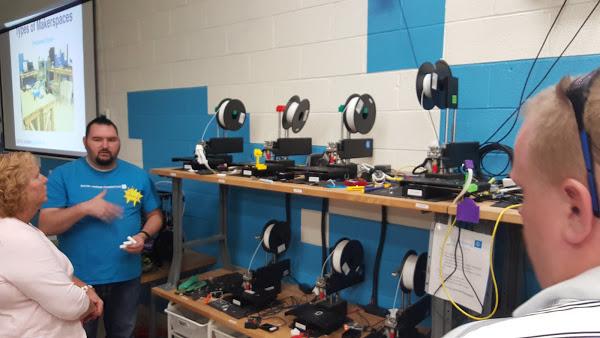
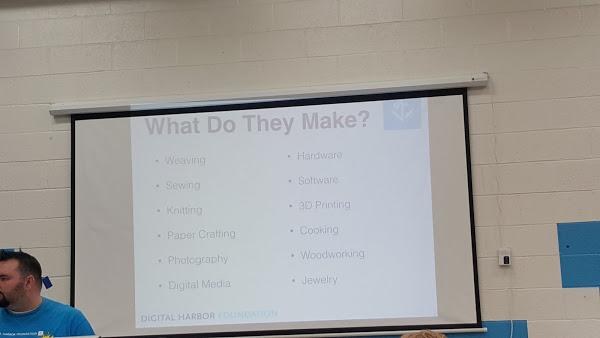
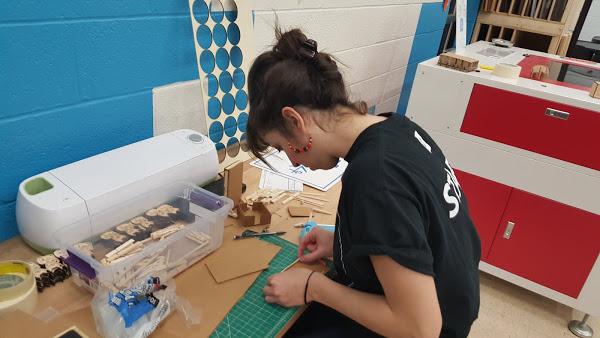
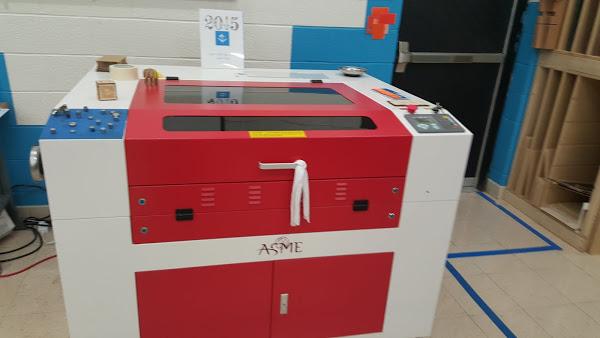
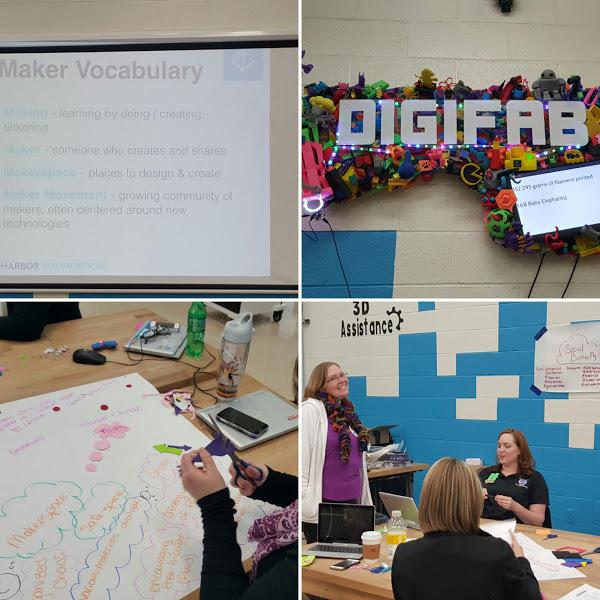
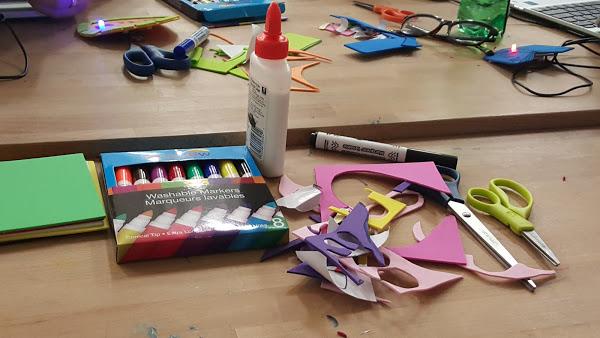
I recently took part in professional development at The Digital Harbor Foundation (DHF), a non-profit organization that provides various activities for children and adults. The activities are varied: design cookie cutters, invention planning, and design using 3D printers.  At The DHF, attendees are encouraged to create using the materials that are available in the space: batteries,  sticky tape,  construction paper, 3D printers, markers,  etc.

3D Printer
DHF employees planning for the evening event.


The PD was partnership effort between the BCPS Office of Digital Learning and The Digital Harbor 

Foundation. Attendees ranged from classroom teachers: science,  technology, reading, and special educators, as well as library media specialists, resource teachers, and a principal.

After attending the PD, I created a "To Do" list, in order to get the ball rolling in my quest to create a makerspace in The SMaRTZone. The ideas below are based on  information shared by our presenters, as well as "Aha" moments I had during the presentation.

Activities for me to consider:
● Digital designer (program)
● Shark Tank -- students create inventions and sell them
● Encourage our school to have a PD for our teachers at The DHF.
● Suggest this to dream and Flourish
● Bring my library helpers and avid readers --check w/DHF about times and dates
● Check to see if they Periscope and have viewing of sessions
● Get more information about their Minecraft activities.
● Look into Artbox, Makered program.

Other ideas and resources:
● Look on YouTube for various hacks related to makerspaces, student inventions,  etc.
● Get info about Caine's Arcade (as a sample for the kids)

I encourage anyone who is interested in makerspaces to check out the services offered at The Digital Harbor.  There are workshops for educators, youth, and the community. The staff is knowledgeable and are excited with the prospect to get more students and adults to think of themselves as makers. 

Wednesday, December 16, 2015

SMaRTZone Updates for December

Parents and students are reminded to use the FolletShelf feature icon Destiny in order to read ebooks.   The SMaRTZone has one of the largest, middle school selections of ebooks (646) in Baltimore County.  Any user of Destiny is able to log into the system using their BCPS username and password. 

Once you are in Follett Shelf, you are able to read numerous books.  Some of the ebooks even offer interactive features.  Please take a moment to check-out the Follett Shelf.  Below are some of the student comments regarding the advantages of ebooks:


There will be days available during various lunch shifts when students can enjoy the SMaRTZone in a less structured fashion.  Students who come to the SMaRTZone during that time will have the chance to work on projects, read, check out books, as well as time to play various games. 


Below are the statistics for Library Usage from November 2- December 4.  We are seeing a steady increase in student usage and Grade 6 Language Arts/Reading classes have the lead in visits.


Tuesday, October 27, 2015

The beginning of the 2015-2016 school year has been a busy one in The SMaRTZone.  Sixth grade students received Library Orientation and checked out their first set of books.  Seventh and eighth graders also checked out books in The SMaRTZone and received information about Amnesty Week. Using the data from Library Trac, we have had 204 students visit the library independently, twenty class visits, and a total of 1306 students in the library for lessons, testing, lunch bunch, etc.


Thanks to prior planning , the end of the previous school year, Mrs. Thomas-Aulu and Ms. Love worked on a cyber bullying lesson that was shared with students in the seventh grade.  As a result of the lesson, a number of students created public service announcement (PSAs) regarding the hazards of cyber bullying.  The PowerPoints, Prezis, and videos will be shared with students at a later date.


The SMaRTZone will have a number of activities that students can take part in, after school.  Makerspaces will be debuted, as well as gaming activities, and poetry workshops. Be on the lookout for more information.
In order to stay up-to-date on The SMaRTZone, remember we are just a Google away.  If you Google, WMMS SMaRTZone, you will see links to our social media profile: Twitter, Facebook, YouTube, Instagram, Scoop.it, and Livebinders.  Contact Ms. Love if you have any questions or suggestions for the library program at tlove@bcps.org


Saturday, June 27, 2015


My session titled, Cool Curation Tools,  will be on Monday, June 29, 2015.  It will begin at 8:30 am in PCC 108, Table 2.  If you are looking for great ways to sort through all the information you will receive at ISTE come to my session. I hope to see you there.


Cool Curation Tools


Cool Curation Tools

Sometimes, when I discuss curation with someone who isn't a library media specialist I see their eyes glaze over.  A few minutes later, the person will admit that they don't know what curation is.  I then blather on about storing information but recently I realized a picture (or in this case a video) is worth a thousand words.


I have compiled some of my favorite curation tools in the area below. Many of them are my favorites because they provide me with the following:

1. The ability to select what I share with the public.
2.  A format to share various online resources (video, images, etc.).
3.  They are free.*
4.  They are easy.
5.  I can use them to develop a professional network.
6.  I can use them with my students and other members of the school community.
7.  It helps me put information in one place so I can refer to it later.


Livebinder
Think of Livebinder as a virtual three-ring binder.  You pick what information to put in the your binder and you create the tabs where the information is stored. Livebinder does it all.  

You can use it a professional tool, as a personal tool, and as a tool to curate content for your students.  Some people even use it as a resume builder.


Storify

Storify gives you a chance to publish content that is retrieved from Twitter, RSS feeds, Google +, and much more. View a few samples here.


Instagram is an easy way to create visual memories. Many people use Instagram as a personal curation tool but it is great way to document what you are doing professionally.  

As a library media specialist,  I love Instagram because it's an easy way to document what is going on in the library.   Whether it's a video of the kids in the Lunch Bunch, a picture of the students reading or clips of co-teaching, Instagram is one way to "brand" the library and advertise what is happening inside and outside the library walls. 

Before using Instagram, make sure you are aware of the policies your district has for social media.


Edmodo is similar to Facebook but it is for your school community. I use it to store content for various lessons, as well as to share information and alerts to students and staff in my school.

Top Three Reasons to Use this with your Students
1.  It's private.
2.  You are able to select the content you share with the students.
3. You are able to select the content you share with others.


I love Edmodo so much that I made a video.


A great way to promote writing, KidBlog gives your students a chance to create a blog.  The teacher selects who is able to view the information and is able to add or delete users.

Top Three Reasons to Use KidBlog with Students.
1. Private.
2.  Promotes the writing process
3. Advertise 
View a sample here.


It seems like everyone uses Twitter now but not too many people use the Twitter List feature.
Curate your favorite Twitter Connections and hashtags by creating a list of Twitter users who discuss the topics you wish to focus on the most.  It's a great way to filter and curate all the information that comes your way.


Have you ever watched a YouTube video? Have you ever thought about making your own channel?  Produce your own channel by uploading videos.  You can even create a playlist of your favorite videos based on topics.  This curation tool can be used as a professional and personal tool.


Top Three Reasons to use YouTube as a curation tool.

1. Advertise your work.
2.  It's dynamic.
3.  Create a playlist of your favorites videos.

View the wmms_smartzone channel


Many people use Pinterest as a form of information.  You can also use it to curate your favorite Twitter favorites, images, videos, etc.


A dashboard for your favorite websites, Symbaloo is a great tool to use for all of those websites you visit the most or even the websites you want to visit but sometimes forget.


Symbaloo is also easy access for students and other users.


A few cautions when creating a Symbaloo:
1.  Less is more.
2.  Choose sites that are updated regularly.
3.  Don't be afraid to make changes.


A visual newspaper.  You select the links that you wish to use.  Scoop.it even offers suggestions.  You can just scoop the links you want and discard the ones you don't want. 


Scoop.it samples
http://www.scoop.it/u/tlovebooks


Watch the video to the right to learn how to use Scoop.it.


Visit the livebinder that I created titled, Cool Curation Tools to get more information about these cool curation tools, as well as to gain access to quick tutorials.

* I mentioned that many of these are free and they are.  A number of them do ask for payment if you wish to enhance the tools and/or to increase the storage space.


Sunday, May 3, 2015

Future Lesson Ideas from Scholastic

Check out @ScholasticTeach's Tweet: https://twitter.com/ScholasticTeach/status/594842341913014272?s=09

Wednesday, April 22, 2015

Creating more co-teaching opportunities within the school community

For a number of years, I wondered,
"How can I get more teachers to work with me as they present units to their classes?"
I remembered the advice
I received from a library media specialist years ago. The advice was that I should work with those who wanted to work with me. For a number of years, this advice worked (somewhat). I presented PDs about online databases, the primary/secondary resources in the library, and the ways teachers could utilize the library collection to bring their units to life.

The one set back was the amount of teacher transition in our building. Each year a number of teachers would leave our building and nearly twenty percent of the teacher population would transfer, retire or leave the teaching profession. The relationships that had been formed would have to be formed again. With each new year, new teachers would arrive to the building and the cycle of introductions and advertising the library program and its resources would begin.  It became daunting and the advice to wait for those who wanted to work with me seemed ill-advised.

In the 2013-2014 school year, I had an idea to get more teachers to use VoiceThread (VT) with their students. I had just completed a summer course on VT and was excited about the stories I had learned about teachers using the online discussion tool to reinforce learning. By using VT, teachers had used the tool to get students to discuss their ideas in the online forum and to enhance their lessons.

My thought was that VT would help the teachers in my school flip and blend the learning in their classrooms while they integrated technology into their lessons. I also saw it as an opportunity to work with teachers. With the backing of the principal, I created a plan for a series after-school workshops that would provide teachers with the information they would need in order to create their own VTs and use the VTs with their students.

During the summer, I created VT accounts for all the students enrolled in our school. Information about VT was shared with the teachers, an Animoto video was made to increase interest and a representative from the Office of Technology agreed to come to the school to present the workshops. I also created a Livebinder  (an online resource used to store information in a virtual three-ring binder format) which included samples of VTs, suggested procedures, resources, and a synopsis of the workshops. The workshops has a number of issues: attendance and willingness to commit. At first, teachers were excited to try the new technology; however, once testing, PBAs, and other assessments began the excitement for the initiative waned. The number of attendees became problematic and the desire to create VT that could be used with students lessened.

After the workshops, a few teachers used VT with their students; however, the vision I had of co-teaching a variety of lessons was not fully realized. I did assist a teacher as she planned her VT lesson and aided in the implementation of the lesson. While this planning and implementation only occurred twice, it was an increase in my work with the math department. My secondary hope was to see an increase in the number of math classes that used the computer lab and an increase in co-teaching opportunities with the math department. Although the opportunity only presented itself twice, it was an increase from the previous year (zero encounters) to two lessons in the 2013-2014 school year. While it was an improvement, I had hoped for more and realized I had to do some reflection.

Based upon my experience with the after-school workshops, I wouldn't initiate it again. One set back was the requirement that teachers attend three of the four face-to-face sessions. For requiring attendance was important for two reasons. First, a representative from the Office of Technology (now Digital Learning) was coming to the school to present the information to the teachers. By doing this, after school, he was sharing his free time to help teachers learn more about this tool. Second, VT classes were offered three times a year through the county for credits; however, many teachers had one or more of the following complaints: the locations for the courses were too far away, the times for the classes didn't fit their schedules and/or the dates for the courses didn't work with their schedules. By offering the workshops in the school, once a month and after school, my thought was that the convenience would make the workshops more attractive to the teachers; however,
the requirement of attendance seemed to lead to some resistance.

The resistance (I feel) was a factor in the low number of VT lessons and co-teaching opportunities that occurred during the school year and once the workshops completed. To be frank, this resistance was problematic for me and lead me to my conclusion that I wouldn't initiate the concept of an after-school workshop again. Instead, sharing resources with teachers through department meetings, as well as utilizing the school newsletter to promote resources ideas became my focus. I share the resources, offer suggestions and work with those who wish to utilize my skills and the resources of the library.

I also put more focus on the students and increased my efforts to build their excitement for new tools and library resources in a variety of after-school get-togethers.  One tool was the use of video to advertise the resources in the library. Below is a sample of a video that was shared with students in order to advertise the library program.
WMMS: Building a Reading and Research Community
Stay tuned for more information.

Monday, June 2, 2014

Planning for Next Year

Now is the time to do a bit of reflection.  The school year is winding down and I need to determine how I can AMP UP next year's library program.  Instead of depending on my memory to serve as a barometer for change, I am asking for teacher feedback. My hope is that their input will guide me as I decide what changes to make to the library program at our school.  Here are a few of the ideas rambling around in my head:

1.  Offer Tech Tuesdays once a month, where teachers can come into The SMaRTZone and participate in an Edcamp style workshop to discuss new technological tools and tricks.
2. Offer Tech Tuesdays once a month, where students can come to The SMaRTZone and present tips and tricks for students when it comes to various Web 2.0 technologies.  NOTE- Topic approval will be required.


For now, I am sending our a survey to teachers who used the library during the school year, to get a sense of what changes (if any) they would like to see in The SMaRTZone. Wish me luck.